[ Your Headline ] [ Highlight Word ]

[ One or two lines describing the offer — e.g. "Experience our services with a FREE 30-minute consultation." ]

[ Optional second line, e.g. "Have a concept in mind? Let's brainstorm together!" ]

Google ★★★★★ 4.8
GoodFirms ★★★★★ 4.7
Clutch ★★★★★ 5.0
Software,Software Product Development

Childcare Management Software in 2026: What a Daycare Management System Should Actually Do

Ashok Rathod

Tech Consultant

Posted on
23rd Jul 2026
7 min
Read
Share

Table of Contents

  • Quick Tips
  • Familiarize yourself with Cash App
  • Enable two-factor authentication
  • Utilize the optional Cash App
  • Conclusion

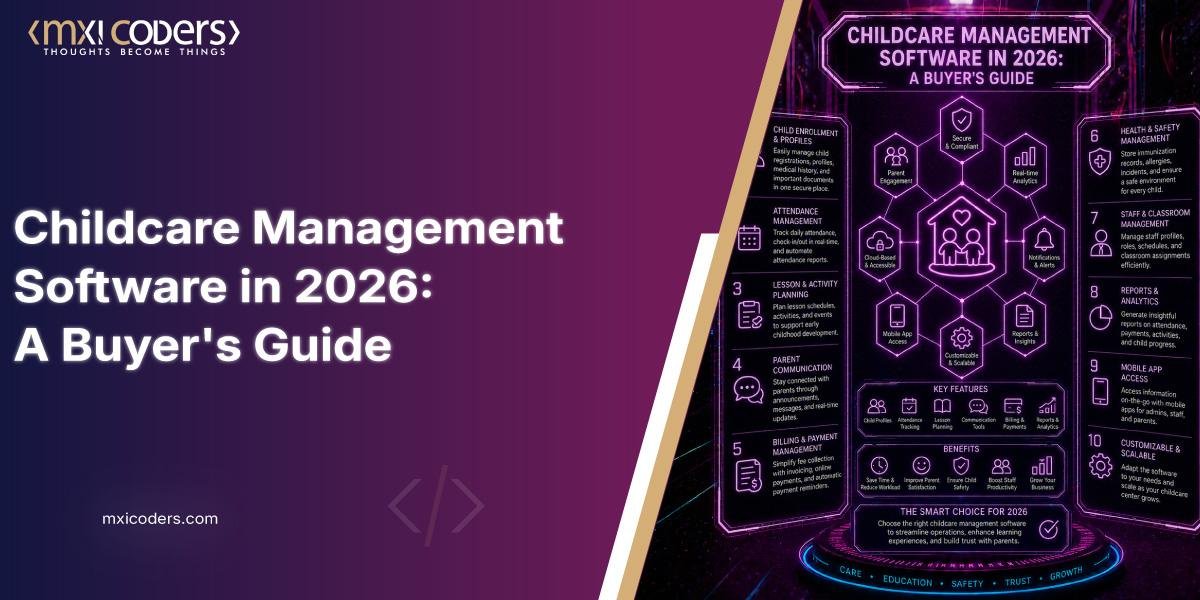
A childcare management system is software that combines enrollment, attendance, billing, and parent communication into one platform for daycare centers and preschools. Most centers use it to replace paper sign-in sheets, spreadsheet tuition tracking, and scattered text-message updates with a single system staff and families both check daily.

➤ What’s the Difference Between a Daycare Management System and Preschool Management Software?

The terms are mostly interchangeable, but the emphasis shifts with age group. A daycare management system tends to lean harder on infant and toddler documentation, since diapering logs, feeding schedules, and nap tracking matter more for that age range. Preschool management software usually puts more weight on lesson planning, developmental milestones, and kindergarten-readiness reporting. In practice, most platforms sold today cover both, and the distinction matters more for marketing than for functionality. What actually varies between products is depth: does the system just log attendance, or does it also handle billing, staffing, and compliance in the same place?

➤ Do You Actually Need a Childcare CRM, or Just Enrollment Software?

Enrollment software gets a family from application to enrolled. A childcare CRM does more: it tracks every prospective family from first inquiry through tour, waitlist, enrollment, and eventual re-enrollment or referral, the way a sales pipeline works in any other business. If your center has a waitlist, seasonal enrollment cycles, or multiple locations competing for the same families, the CRM layer is what tells you where leads are stalling and which marketing source actually fills seats. A basic sign-up form can’t do that. Centers running at or near capacity with a short, predictable enrollment cycle often don’t need the CRM layer at all — a simple digital application is enough.

➤ How Does Daycare Payment Software Actually Cut Down on Late Tuition?

Daycare payment software automates the mechanical parts of billing: recurring invoices, autopay enrollment, and reminders that go out before a payment is due rather than after it’s late. The bigger risk directors often miss is compliance, not convenience. Any system that stores, processes, or transmits card data falls under the PCI Security Standards Council’s PCI DSS framework, which applies to any organization handling cardholder information regardless of size. Ask a vendor directly whether their platform is PCI DSS v4.0.1 compliant and who holds that responsibility, the software provider or your center, because that liability doesn’t disappear just because a third party processes the card.

➤ Comparing Your Options

OptionMechanismBest fitTrade-off
Spreadsheet + manual invoicingStaff track attendance, billing, and messages by hand across separate toolsVery small, single-room home daycaresHigh labor cost, error-prone, no compliance audit trail
Billing-only softwareAutomates tuition and payment reminders, little elseCenters with strong communication habits already, weak billing processDoesn’t solve enrollment or staff scheduling gaps
Full childcare management software (CCMS)Combines enrollment, attendance, billing, and parent messaging in one loginMulti-classroom centers wanting one system of recordHigher cost, longer onboarding, can be more than a tiny center needs
CRM-first platformAdds lead tracking, tour scheduling, and pipeline reporting on top of core featuresMulti-site operators or centers with active waitlists and marketing spendOverkill for centers that are already at capacity with no active recruiting

➤ What Security and Compliance Standards Should You Actually Check?

Two areas matter most, and neither is optional. First, payment handling: confirm the vendor’s PCI DSS status directly rather than taking “secure payments” marketing language at face value. Second, staffing compliance: if the platform advertises ratio monitoring, check that it reflects your state’s actual licensing minimums, not just a generic default. The National Association for the Education of Young Children (NAEYC) sets voluntary accreditation-level group size and ratio benchmarks — for example, no more than 8 infants per group with 2 teaching staff — that are often stricter than state licensing minimums, so a system built only around bare state law may understate what a higher-quality program actually needs to track.

➤ How Do You Evaluate a CCMS Before You Buy?

A useful way to cut through vendor demos is what I’d call a three-layer test: does the feature save time, does it reduce a specific compliance risk, and would you notice its absence within a week of going live? Anything that fails all three is a feature you’re paying for but won’t use.

With that filter in mind, run through this checklist with any vendor:

  • All-in-one, honestly: Does billing, communication, and staff management genuinely live in one system, or will you still need to pay for a second tool for one of them?
  • Staff and parent usability: Can a new hire or a first-time parent use the mobile app without a training session?
  • Data handling: Where is data stored, who can access it, and is payment processing PCI DSS compliant?
  • Support model: Is onboarding included, or billed separately, and what’s the actual response time on a support ticket?
  • Pricing transparency: Are payment-processing fees itemized, or bundled into a number that changes once you’re a few months in?

➤ What Are the Real Limitations of Childcare Management Software?

No platform removes every administrative burden, and a few trade-offs are worth naming honestly. Switching systems mid-year means a data migration window where errors are more likely, not less. Family adoption of a parent app is never 100%; some caregivers will still call or hand you a paper form regardless of what you buy. And CRM-style lead tracking only pays for itself if someone on staff actually works the pipeline; the software surfaces the data, it doesn’t chase the family for you. Centers considering a switch should budget for a transition period, not expect an instant fix.

➤ Frequently asked questions

  1. Is childcare payment software the same as a childcare CRM?
    No. Payment software handles billing and collections; a CRM handles the relationship with a family before and after they enroll, including leads that never convert. Some platforms bundle both, but they solve different problems, so check which one you’re actually missing before you shop.
  2. Does preschool management software need to be different from daycare software for infants?
    Functionally, less than the marketing suggests. The core system (attendance, billing, messaging) is usually identical; what changes is which reporting templates are emphasized, developmental milestones for preschool versus feeding and diapering logs for infant care.
  3. What should I ask about a CRM specifically, beyond general software questions?
    Ask how leads are tracked from first contact to enrollment, whether tour scheduling is built in, and whether the system reports which marketing channel is actually producing enrolled families, not just inquiries.
  4. Are daycare payment software fees the responsibility of the center or the software vendor?
    That depends entirely on your contract, and it’s worth reading closely. PCI DSS compliance obligations generally sit with any organization that stores, processes, or transmits card data, which can include your center even when a vendor’s platform handles the transaction. Confirm this explicitly rather than assuming the vendor’s compliance covers you.
  5. How long does switching to a new daycare management system actually take?
    It varies by center size and how much historical data needs to move over, but expect a genuine transition period rather than an instant cutover, with some overlap where staff are learning the new system alongside the old process.

➤ Conclusion

Choosing childcare management software comes down to matching the tool to what’s actually breaking in your current process. A small, steady-enrollment center often needs solid billing automation and nothing more. A growing, multi-site operation chasing waitlists needs the CRM layer as much as it needs attendance tracking. What doesn’t change is the due diligence: verify payment security directly, check ratio and compliance reporting against a real standard like NAEYC’s, and budget honestly for the transition period rather than expecting a same-week fix.

➤ Ready to Simplify Your Center’s Operations?

If you’re evaluating a childcare management system for your center, Mxicoders’ CCMS combines enrollment, billing, attendance, and parent communication in one platform, with transparent pricing and dedicated onboarding support. Request a free demo to see how it fits your center’s specific billing model and staff size.
➤ Sources Used

  • PCI Security Standards Council — PCI DSS v4.0.1 applicability to any organization storing, processing, or transmitting cardholder data.
  • NAEYC — The 10 NAEYC Program Standards — accreditation-level group size and staff ratio benchmarks.

A childcare management system is software that combines enrollment, attendance, billing, and parent communication into one platform for daycare centers and preschools. Most centers use it to replace paper sign-in sheets, spreadsheet tuition tracking, and scattered text-message updates with a single system staff and families both check daily.

➤ What’s the Difference Between a Daycare Management System and Preschool Management Software?

The terms are mostly interchangeable, but the emphasis shifts with age group. A daycare management system tends to lean harder on infant and toddler documentation, since diapering logs, feeding schedules, and nap tracking matter more for that age range. Preschool management software usually puts more weight on lesson planning, developmental milestones, and kindergarten-readiness reporting. In practice, most platforms sold today cover both, and the distinction matters more for marketing than for functionality. What actually varies between products is depth: does the system just log attendance, or does it also handle billing, staffing, and compliance in the same place?

➤ Do You Actually Need a Childcare CRM, or Just Enrollment Software?

Enrollment software gets a family from application to enrolled. A childcare CRM does more: it tracks every prospective family from first inquiry through tour, waitlist, enrollment, and eventual re-enrollment or referral, the way a sales pipeline works in any other business. If your center has a waitlist, seasonal enrollment cycles, or multiple locations competing for the same families, the CRM layer is what tells you where leads are stalling and which marketing source actually fills seats. A basic sign-up form can’t do that. Centers running at or near capacity with a short, predictable enrollment cycle often don’t need the CRM layer at all — a simple digital application is enough.

➤ How Does Daycare Payment Software Actually Cut Down on Late Tuition?

Daycare payment software automates the mechanical parts of billing: recurring invoices, autopay enrollment, and reminders that go out before a payment is due rather than after it’s late. The bigger risk directors often miss is compliance, not convenience. Any system that stores, processes, or transmits card data falls under the PCI Security Standards Council’s PCI DSS framework, which applies to any organization handling cardholder information regardless of size. Ask a vendor directly whether their platform is PCI DSS v4.0.1 compliant and who holds that responsibility, the software provider or your center, because that liability doesn’t disappear just because a third party processes the card.

➤ Comparing Your Options

OptionMechanismBest fitTrade-off
Spreadsheet + manual invoicingStaff track attendance, billing, and messages by hand across separate toolsVery small, single-room home daycaresHigh labor cost, error-prone, no compliance audit trail
Billing-only softwareAutomates tuition and payment reminders, little elseCenters with strong communication habits already, weak billing processDoesn’t solve enrollment or staff scheduling gaps
Full childcare management software (CCMS)Combines enrollment, attendance, billing, and parent messaging in one loginMulti-classroom centers wanting one system of recordHigher cost, longer onboarding, can be more than a tiny center needs
CRM-first platformAdds lead tracking, tour scheduling, and pipeline reporting on top of core featuresMulti-site operators or centers with active waitlists and marketing spendOverkill for centers that are already at capacity with no active recruiting

➤ What Security and Compliance Standards Should You Actually Check?

Two areas matter most, and neither is optional. First, payment handling: confirm the vendor’s PCI DSS status directly rather than taking “secure payments” marketing language at face value. Second, staffing compliance: if the platform advertises ratio monitoring, check that it reflects your state’s actual licensing minimums, not just a generic default. The National Association for the Education of Young Children (NAEYC) sets voluntary accreditation-level group size and ratio benchmarks — for example, no more than 8 infants per group with 2 teaching staff — that are often stricter than state licensing minimums, so a system built only around bare state law may understate what a higher-quality program actually needs to track.

➤ How Do You Evaluate a CCMS Before You Buy?

A useful way to cut through vendor demos is what I’d call a three-layer test: does the feature save time, does it reduce a specific compliance risk, and would you notice its absence within a week of going live? Anything that fails all three is a feature you’re paying for but won’t use.

With that filter in mind, run through this checklist with any vendor:

  • All-in-one, honestly: Does billing, communication, and staff management genuinely live in one system, or will you still need to pay for a second tool for one of them?
  • Staff and parent usability: Can a new hire or a first-time parent use the mobile app without a training session?
  • Data handling: Where is data stored, who can access it, and is payment processing PCI DSS compliant?
  • Support model: Is onboarding included, or billed separately, and what’s the actual response time on a support ticket?
  • Pricing transparency: Are payment-processing fees itemized, or bundled into a number that changes once you’re a few months in?

➤ What Are the Real Limitations of Childcare Management Software?

No platform removes every administrative burden, and a few trade-offs are worth naming honestly. Switching systems mid-year means a data migration window where errors are more likely, not less. Family adoption of a parent app is never 100%; some caregivers will still call or hand you a paper form regardless of what you buy. And CRM-style lead tracking only pays for itself if someone on staff actually works the pipeline; the software surfaces the data, it doesn’t chase the family for you. Centers considering a switch should budget for a transition period, not expect an instant fix.

➤ Frequently asked questions

  1. Is childcare payment software the same as a childcare CRM?
    No. Payment software handles billing and collections; a CRM handles the relationship with a family before and after they enroll, including leads that never convert. Some platforms bundle both, but they solve different problems, so check which one you’re actually missing before you shop.
  2. Does preschool management software need to be different from daycare software for infants?
    Functionally, less than the marketing suggests. The core system (attendance, billing, messaging) is usually identical; what changes is which reporting templates are emphasized, developmental milestones for preschool versus feeding and diapering logs for infant care.
  3. What should I ask about a CRM specifically, beyond general software questions?
    Ask how leads are tracked from first contact to enrollment, whether tour scheduling is built in, and whether the system reports which marketing channel is actually producing enrolled families, not just inquiries.
  4. Are daycare payment software fees the responsibility of the center or the software vendor?
    That depends entirely on your contract, and it’s worth reading closely. PCI DSS compliance obligations generally sit with any organization that stores, processes, or transmits card data, which can include your center even when a vendor’s platform handles the transaction. Confirm this explicitly rather than assuming the vendor’s compliance covers you.
  5. How long does switching to a new daycare management system actually take?
    It varies by center size and how much historical data needs to move over, but expect a genuine transition period rather than an instant cutover, with some overlap where staff are learning the new system alongside the old process.

➤ Conclusion

Choosing childcare management software comes down to matching the tool to what’s actually breaking in your current process. A small, steady-enrollment center often needs solid billing automation and nothing more. A growing, multi-site operation chasing waitlists needs the CRM layer as much as it needs attendance tracking. What doesn’t change is the due diligence: verify payment security directly, check ratio and compliance reporting against a real standard like NAEYC’s, and budget honestly for the transition period rather than expecting a same-week fix.

➤ Ready to Simplify Your Center’s Operations?

If you’re evaluating a childcare management system for your center, Mxicoders’ CCMS combines enrollment, billing, attendance, and parent communication in one platform, with transparent pricing and dedicated onboarding support. Request a free demo to see how it fits your center’s specific billing model and staff size.

➤ Sources Used

  • PCI Security Standards Council — PCI DSS v4.0.1 applicability to any organization storing, processing, or transmitting cardholder data.
  • NAEYC — The 10 NAEYC Program Standards — accreditation-level group size and staff ratio benchmarks.

Feel free to Connect us on

Ready to transform your business with smart software solutions?

Harness the power of custom software development to streamline operations, reduce costs, and boost efficiency. Start by exploring cutting-edge approaches like cloud-native platforms, API-first architecture, and AI-driven automation to future-proof your systems and stay ahead of the competition.

Book free consultation

Let’s build your idea together and serve society.

Author

Ashok Rathod

Tech Consultant

Experience
25 Years
Growth Architect for Startups & SMEs | Blockchain, AI , MVP Development, & Data-Driven Marketing Expert.

Transform the Carbon Credit Industry

Build a Transparent, Scalable Carbon Credit Marketplace with Blockchain.

Index

Get in Touch

Ready to transform your ideas into reality? Contact our team today and let’s discuss your project.