...
Blockchain,Coinbase,Crypto Exchange

Does Coinbase Wallet Charge Fees? Complete Guide to Managing Funds

Ashok Rathod

Tech Consultant

Posted on
8th Oct 2024
7 min
Read
Share

Table of Contents

  • Quick Tips
  • Familiarize yourself with Cash App
  • Enable two-factor authentication
  • Utilize the optional Cash App
  • Conclusion

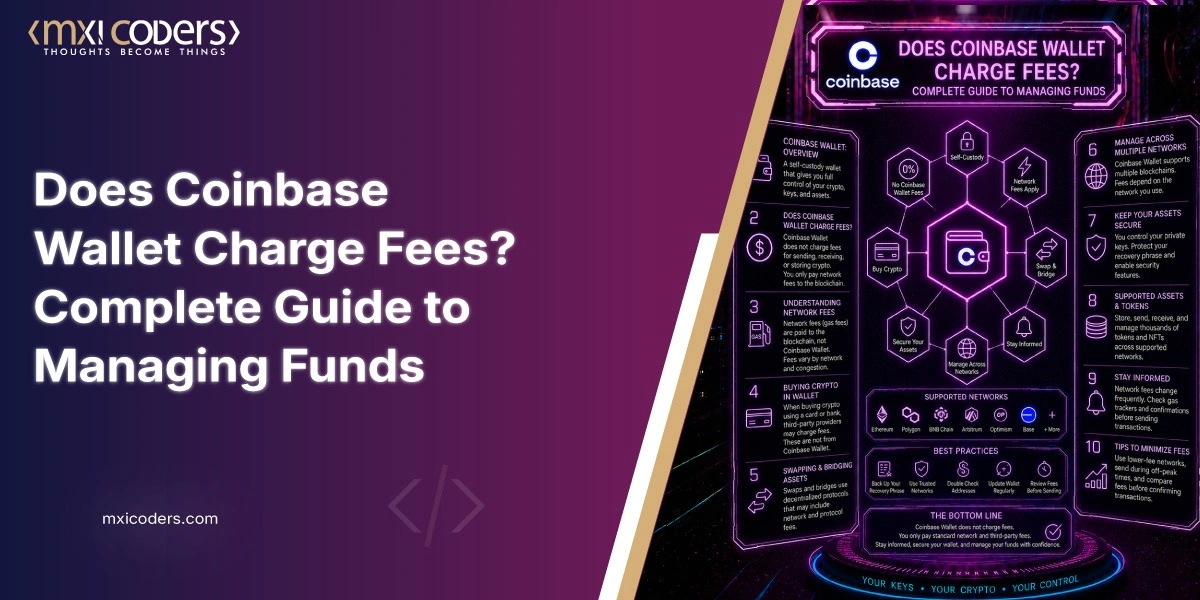
Coinbase Wallet is one of the most widely used self-custody crypto wallets in the world, trusted by millions of users to store, send, and manage digital assets. But one question comes up constantly from both first-time users and experienced holders: does Coinbase Wallet actually charge fees?

The short answer is yes, but only for specific actions. Everything else is free. This guide explains exactly what you pay for, when you pay it, and how to manage your funds as securely as possible.

➤ Does Coinbase Wallet Have a Fee?

Yes, Coinbase Wallet charges fees, but only for specific on-chain actions. Here is what you will and will not pay for.

Free actions: – Creating and maintaining a Coinbase Wallet – Holding any cryptocurrency or token – Receiving funds from another wallet address – Browsing your transaction history or portfolio balance

Actions that cost fees: – Sending cryptocurrency to another wallet address – Swapping one token for another inside the app – Interacting with decentralized applications (dApps) onchain

The fees you pay when sending or swapping are network fees, also called gas fees. These are not collected by Coinbase. They go directly to the blockchain validators who process and confirm your transaction. To understand how blockchain verifies and records each transaction, the gas fee is the economic incentive that makes the entire system run.

Fee amounts vary based on two factors: which blockchain you are using and current network congestion. Ethereum gas fees can spike significantly during periods of high activity. Networks like Polygon, Base, and Solana typically cost a fraction of a cent per transaction. Coinbase Wallet lets you choose your fee priority (low, medium, or high) so you can trade confirmation speed for cost.

For token swaps inside the app, Coinbase adds a small service fee on top of the network fee. This is shown clearly in the swap preview before you confirm. There are no hidden charges.

Important distinction: Coinbase Wallet (the self-custody app) is a completely separate product from Coinbase.com (the centralized exchange). The exchange has its own fee schedule for buying and selling. This guide covers only the Coinbase Wallet app.

➤ Is Coinbase Wallet Safe?

Yes, Coinbase Wallet is one of the more secure options for holding crypto, primarily because it is self-custody. Self-custody means your private keys are stored on your device only, not on Coinbase’s servers. Coinbase cannot access your funds, freeze them, or lose them in a platform-level breach.

This matters. When you hold crypto on a centralized exchange, you are trusting a third party to safeguard your keys. With Coinbase Wallet, you are the only keyholder. If you lose your 12-word recovery phrase, no one, including Coinbase support, can restore access. That responsibility is yours alone.

The app includes biometric authentication (Face ID and fingerprint), optional PIN protection, and a transaction approval prompt that requires your explicit confirmation before any funds move. Understanding the broader picture of blockchain in fintech helps explain why self-custody wallets are considered the gold standard for asset protection.

The most common security failures in self-custody are user errors: losing the recovery phrase, downloading a fake wallet app from an unofficial source, or approving a malicious smart contract without reading it. The practices below address every one of those failure modes.

Also Read: What Is Tokenization in Blockchain? A Complete Beginner’s Guide

➤ How to Securely Manage Funds in Your Coinbase Wallet

Owning a self-custody wallet means you own the security responsibility. These eight practices cover the full attack surface.

➥ Enable Two-Factor Authentication

Enable two-factor authentication (2FA) on your Coinbase Wallet app and any linked Coinbase account. Authenticator-app-based 2FA (Google Authenticator, Authy) is significantly more secure than SMS-based 2FA, which is vulnerable to SIM-swap attacks. Enable the strongest option available and never disable it for convenience.

➥ Create a Strong, Unique Password

Use a password of at least 16 characters mixing uppercase, lowercase, numbers, and symbols. Never reuse a password from any other account. A password manager generates and stores strong credentials so you never need to compromise security for memorability.

➥ Keep Your Recovery Phrase Offline

Your 12-word recovery phrase is the master key to your entire wallet. Anyone who has it can access all your funds on any device. Never store it digitally: no photos, no notes apps, no cloud storage, no email drafts. Write it on paper and keep it in a physically secure location. For larger holdings, a fireproof metal backup plate eliminates the risk of losing it to water or fire damage. This single practice prevents the most catastrophic and unrecoverable self-custody failure mode.

➥ Use a Hardware Wallet for Larger Holdings

A hardware wallet stores private keys completely offline on a dedicated physical device. Even if your phone is infected with malware, a hardware wallet remains safe because every transaction requires physical button confirmation on the device. Ledger and Trezor both integrate natively with Coinbase Wallet. If the value of your portfolio exceeds what you would be comfortable losing, a hardware wallet is a proportionate investment.

➥ Check for Secure Connections Before Signing

Always confirm https:// appears in any URL before connecting your wallet or approving a transaction on a web-based dApp. Never use a public Wi-Fi network without a VPN when accessing wallet-related services. Download Coinbase Wallet only from the official Apple App Store or Google Play Store. Phishing sites and counterfeit apps that mimic legitimate wallets are among the most common vectors for crypto theft.

➥ Review and Revoke Connected App Permissions Regularly

Every time you connect your wallet to a dApp, you grant it certain token approvals. Over time, these accumulate. Go to your wallet settings, open connected apps, and revoke access to any dApp you no longer actively use. A compromised or malicious dApp with an old standing approval can drain specific token allowances without any additional confirmation from you. This is one of the most overlooked risks in everyday wallet use.

➥ Never Share Your Account Credentials

No legitimate Coinbase representative, developer, or support team will ever ask for your recovery phrase, private key, or password. If anyone asks, they are attempting to steal your funds. Do not enter your recovery phrase into any form, website, or app other than the official Coinbase Wallet app during a wallet restore. The crypto fraud losses reported to the FTC have grown every year, and credential theft remains the leading vector.

➥ Use the Vault for Long-Term Holdings

Coinbase.com’s Vault feature adds friction between your funds and any unauthorized withdrawal. It requires multiple approval steps and enforces a mandatory 48-hour waiting period before funds can be moved. For crypto you are holding long term and do not need immediate liquidity access to, the Vault adds a meaningful protective delay that gives you time to catch and cancel unauthorized transactions.

Coinbase Wallet puts you in genuine control of your digital assets. The fees are transparent and disclosed before every transaction. The safety of your wallet depends almost entirely on protecting your recovery phrase and following the practices above consistently.

If you are building a crypto wallet, exchange, or DeFi protocol and want production-grade blockchain infrastructure behind it, Mxicoders has delivered platforms handling over $75 million in trading volume with full KYC, cold storage integration, and multi-chain support. Start a conversation with the team here.
➤ Extra Resources

does coinbase wallet charge fees complete guide to managing funds

Coinbase Wallet is one of the most widely used self-custody crypto wallets in the world, trusted by millions of users to store, send, and manage digital assets. But one question comes up constantly from both first-time users and experienced holders: does Coinbase Wallet actually charge fees?

The short answer is yes, but only for specific actions. Everything else is free. This guide explains exactly what you pay for, when you pay it, and how to manage your funds as securely as possible.

➤ Does Coinbase Wallet Have a Fee?

Yes, Coinbase Wallet charges fees, but only for specific on-chain actions. Here is what you will and will not pay for.

Free actions: – Creating and maintaining a Coinbase Wallet – Holding any cryptocurrency or token – Receiving funds from another wallet address – Browsing your transaction history or portfolio balance

Actions that cost fees: – Sending cryptocurrency to another wallet address – Swapping one token for another inside the app – Interacting with decentralized applications (dApps) onchain

The fees you pay when sending or swapping are network fees, also called gas fees. These are not collected by Coinbase. They go directly to the blockchain validators who process and confirm your transaction. To understand how blockchain verifies and records each transaction, the gas fee is the economic incentive that makes the entire system run.

Fee amounts vary based on two factors: which blockchain you are using and current network congestion. Ethereum gas fees can spike significantly during periods of high activity. Networks like Polygon, Base, and Solana typically cost a fraction of a cent per transaction. Coinbase Wallet lets you choose your fee priority (low, medium, or high) so you can trade confirmation speed for cost.

For token swaps inside the app, Coinbase adds a small service fee on top of the network fee. This is shown clearly in the swap preview before you confirm. There are no hidden charges.

Important distinction: Coinbase Wallet (the self-custody app) is a completely separate product from Coinbase.com (the centralized exchange). The exchange has its own fee schedule for buying and selling. This guide covers only the Coinbase Wallet app.

➤ Is Coinbase Wallet Safe?

Yes, Coinbase Wallet is one of the more secure options for holding crypto, primarily because it is self-custody. Self-custody means your private keys are stored on your device only, not on Coinbase’s servers. Coinbase cannot access your funds, freeze them, or lose them in a platform-level breach.

This matters. When you hold crypto on a centralized exchange, you are trusting a third party to safeguard your keys. With Coinbase Wallet, you are the only keyholder. If you lose your 12-word recovery phrase, no one, including Coinbase support, can restore access. That responsibility is yours alone.

The app includes biometric authentication (Face ID and fingerprint), optional PIN protection, and a transaction approval prompt that requires your explicit confirmation before any funds move. Understanding the broader picture of blockchain in fintech helps explain why self-custody wallets are considered the gold standard for asset protection.

The most common security failures in self-custody are user errors: losing the recovery phrase, downloading a fake wallet app from an unofficial source, or approving a malicious smart contract without reading it. The practices below address every one of those failure modes.

Also Read: What Is Tokenization in Blockchain? A Complete Beginner’s Guide

➤ How to Securely Manage Funds in Your Coinbase Wallet

Owning a self-custody wallet means you own the security responsibility. These eight practices cover the full attack surface.

➥ Enable Two-Factor Authentication

Enable two-factor authentication (2FA) on your Coinbase Wallet app and any linked Coinbase account. Authenticator-app-based 2FA (Google Authenticator, Authy) is significantly more secure than SMS-based 2FA, which is vulnerable to SIM-swap attacks. Enable the strongest option available and never disable it for convenience.

➥ Create a Strong, Unique Password

Use a password of at least 16 characters mixing uppercase, lowercase, numbers, and symbols. Never reuse a password from any other account. A password manager generates and stores strong credentials so you never need to compromise security for memorability.

➥ Keep Your Recovery Phrase Offline

Your 12-word recovery phrase is the master key to your entire wallet. Anyone who has it can access all your funds on any device. Never store it digitally: no photos, no notes apps, no cloud storage, no email drafts. Write it on paper and keep it in a physically secure location. For larger holdings, a fireproof metal backup plate eliminates the risk of losing it to water or fire damage. This single practice prevents the most catastrophic and unrecoverable self-custody failure mode.

➥ Use a Hardware Wallet for Larger Holdings

A hardware wallet stores private keys completely offline on a dedicated physical device. Even if your phone is infected with malware, a hardware wallet remains safe because every transaction requires physical button confirmation on the device. Ledger and Trezor both integrate natively with Coinbase Wallet. If the value of your portfolio exceeds what you would be comfortable losing, a hardware wallet is a proportionate investment.

➥ Check for Secure Connections Before Signing

Always confirm https:// appears in any URL before connecting your wallet or approving a transaction on a web-based dApp. Never use a public Wi-Fi network without a VPN when accessing wallet-related services. Download Coinbase Wallet only from the official Apple App Store or Google Play Store. Phishing sites and counterfeit apps that mimic legitimate wallets are among the most common vectors for crypto theft.

➥ Review and Revoke Connected App Permissions Regularly

Every time you connect your wallet to a dApp, you grant it certain token approvals. Over time, these accumulate. Go to your wallet settings, open connected apps, and revoke access to any dApp you no longer actively use. A compromised or malicious dApp with an old standing approval can drain specific token allowances without any additional confirmation from you. This is one of the most overlooked risks in everyday wallet use.

➥ Never Share Your Account Credentials

No legitimate Coinbase representative, developer, or support team will ever ask for your recovery phrase, private key, or password. If anyone asks, they are attempting to steal your funds. Do not enter your recovery phrase into any form, website, or app other than the official Coinbase Wallet app during a wallet restore. The crypto fraud losses reported to the FTC have grown every year, and credential theft remains the leading vector.

➥ Use the Vault for Long-Term Holdings

Coinbase.com’s Vault feature adds friction between your funds and any unauthorized withdrawal. It requires multiple approval steps and enforces a mandatory 48-hour waiting period before funds can be moved. For crypto you are holding long term and do not need immediate liquidity access to, the Vault adds a meaningful protective delay that gives you time to catch and cancel unauthorized transactions.

Coinbase Wallet puts you in genuine control of your digital assets. The fees are transparent and disclosed before every transaction. The safety of your wallet depends almost entirely on protecting your recovery phrase and following the practices above consistently.

If you are building a crypto wallet, exchange, or DeFi protocol and want production-grade blockchain infrastructure behind it, Mxicoders has delivered platforms handling over $75 million in trading volume with full KYC, cold storage integration, and multi-chain support. Start a conversation with the team here.

➤ Extra Resources

Feel free to Connect us on

Ready to transform your business with smart software solutions?

Harness the power of custom software development to streamline operations, reduce costs, and boost efficiency. Start by exploring cutting-edge approaches like cloud-native platforms, API-first architecture, and AI-driven automation to future-proof your systems and stay ahead of the competition.

Book free consultation

Let’s build your idea together and serve society.

Author

Ashok Rathod

Tech Consultant

Experience
25 Years
Growth Architect for Startups & SMEs | Blockchain, AI , MVP Development, & Data-Driven Marketing Expert.

Transform the Carbon Credit Industry

Build a Transparent, Scalable Carbon Credit Marketplace with Blockchain.

Index